
MASON-Radar
Обновляется
Here is the full translation of the feature list into English.
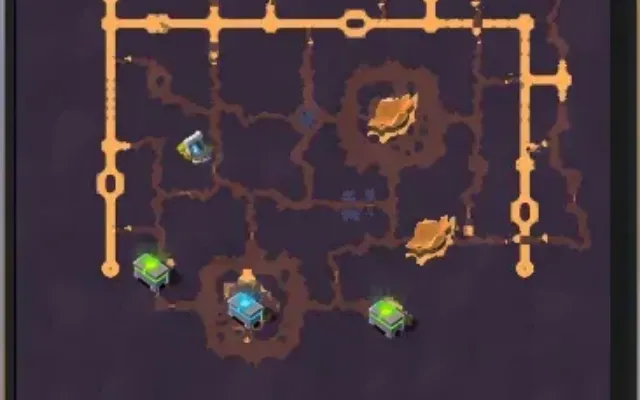
Object Counter: Displays the count of objects on the radar broken down by type (CHEST, MOB, HARV, etc.)
Sound Notifications: Alerts when detecting various object types (players, chests, resources)
Nearest Object Tracker: Automatically detects and displays info about the object closest to the player
Export Coordinates: Saves coordinates of all discovered objects to a text file (Hotkey: F3)
Program functionality may change at any time at the developer's discretion, though we always strive to keep information up to date.
RADAR52
- Radar Options
- Transparent Radar: Adjust opacity
- Radar Size
- Radar X Position
- Radar Y Position
- Radar Zoom: Zoom in/out
- Scan Radius: Set distance for object scanning
- Visuals Colors
- Mobs Color
- NPC Color
- Players Color
- Mounts Color
- Mists Color
- Resources Tier 1–8 Color: (Individual color settings for each tier)
- Chests Color
- Resources
- Enable Filter
- Resources Filter:
- Only Tier 1 Items
- Only Tier 2 Items
- Only Tier 3 Items
- Only Tier 4 Items
- Only Tier 5 Items
- Only Tier 6 Items
- Only Tier 7 Items
- Only Tier 8 Items
- Chests
- Chests Filter:
- Only Tier 1 Chests
- Only Tier 2 Chests
- Only Tier 3 Chests
- Only Tier 4 Chests
- Visual Effects
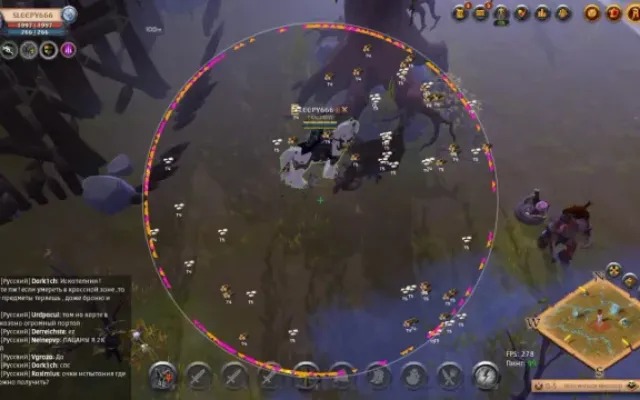
- Snaplines: Lines from radar center to objects for better visualization
- Movement Trails: Shows object movement paths with adjustable length
- Scan Zone: Visualizes the scanning area
- Color Gradients: Gradient coloring for objects
- Object Animations: Pulsing effects with adjustable speed
- Shadows: Depth effect under objects
- Glow Effects: Aura around objects
- Radar Grid: Coordinate grid for orientation
- Zone Boundaries: Visual radar borders with corner markers
- Directional Arrows: Pointers indicating object direction
- Object Icons: Unique icons for different types
- Gradient Lines: Lines with smooth color transitions
- Object Outlines: Contours with adjustable thickness
- Hover Highlight: Highlights objects when moused over
- Distance Rings: Concentric circles to visualize range
- Particle Effects: Particles around VIP objects (Chests, Artifacts)
- Visual Markers: Star markers for important objects
- Pulsating Effects: Object pulsation
- 3D Depth Effect: Visual depth for objects on radar
OTHER25
- Main
- Show Resources: (Wood, stone, ore, etc.)
- Show Mobs
- Show Players
- Show NPCs
- Show Chests
- Show Mists
- Show Mounts
- Distance Filter: Set minimum/maximum distance (objects outside this range are hidden)
- Discovery History: Tracks history of found objects with timestamps
- Hotkeys:
- F1: Menu
- F2: Save
- F3: Export coordinates
- Auto-Save Config: Automatically saves settings every 30 seconds
- Show Distance: Displays distance to radar objects in meters
- Player Proximity Warning: Sound alert when other players approach a set distance
- Object Grouping: Groups objects by type for easier analysis
- Direction Indicator: Shows direction on the radar
- Auto-Hide: Automatically hides objects outside the scan radius
- Detection Statistics: Tracks stats (Time of first/last detection, total count)
- Advanced Sound Alerts: Distinct sounds for different types (Chests, Resources, Players)
- Visual Indicators: Pulsing circles for high-value objects (Chests, Artifacts)
- Priority System: Sorts objects by importance (Chests = Highest priority)
- Object Caching: Optimizes performance
- Встроенный спуфер
- Нет
- Античит
- BATTLEYE
- Обход записи в ОБС
- Да
- Поддерживаемые режимы игры
- Все
- Поддерживаемые процессоры
- Intel и AMD
- Поддерживаемые системы
- Windows 10 x64 (2004, 20H2, 21H1, 21H2, 22H2)
Другие читы для Albion
Все читы
Перед покупкой: что значат статусы читов, как проверить системные требования, как купить чит. Смотрите также все читы для Albion и все читы Mason.