
Salamander
Here is the English translation of the software documentation, formatted for clarity and categorized by functional blocks.
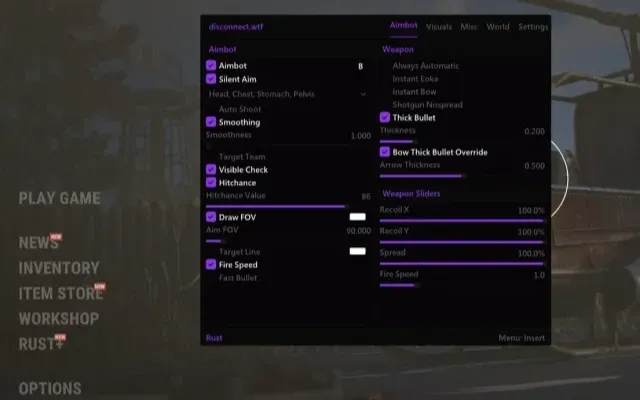
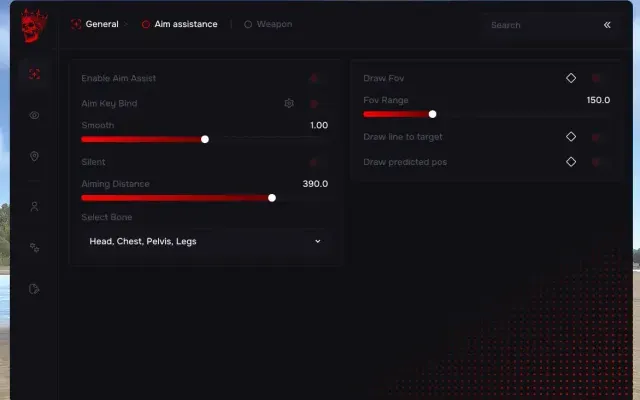
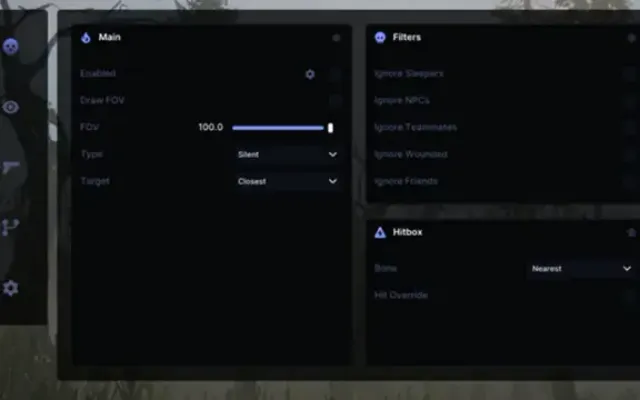
Aim Assist
Silent Aimbot (Risk) — Enables "Silent Aim" mode. This function discreetly adjusts bullet trajectory toward the target while keeping visible mouse movements looking natural. The (BETA) tag indicates instability, while (UnSafe) warns of a high detection risk by anti-cheat systems.
Silent Key — A dedicated hotkey to activate the Silent Aim mode.
Silent Line — Visually displays the bullet's trajectory when using Silent Aim, helping you understand where the shot will land.
Standard Aimbot (Risk) — The main toggle for the standard aimbot. The "UnSafe" mode disables internal anti-detection mechanisms, SIGNIFICANTLY increasing the ban risk. Use at your own peril.
Aimbot Key — The activation key for the aimbot. The assistance only functions while this key is held, making its use feel more controlled and natural.
FOV (Field of View) Radius — Displays the circular area on your screen within which the Silent Aim or Aimbot will lock onto a target.
Crosshair — Overlays a static crosshair in the center of the screen.
Smooth Aim — Adjusts the level of aiming smoothing. Higher values provide fluid, human-like movements rather than sharp, robotic snaps. This is a key setting for "legit" (closet) cheating.
Head — Maximum damage, high risk of manual bans.
Neck — A good balance between damage and stealth.
Chest — The most reliable and "legit-looking" option.
Pelvis — Lower damage, but offers a larger hit zone and higher stability.
No Recoil (Risk) — Completely eliminates weapon recoil. This is highly visible to spectators and easily detectable.
X Value — Manual adjustment for horizontal recoil suppression.
Y Value — Manual adjustment for vertical recoil suppression.
Spread — Reduces bullet spread (as a percentage of the original value).
Visuals (ESP)
NPC/Bot — Displays information regarding non-player characters (bots, mutants, animals).
Box Type — Choose the style of the frame/box displayed around targets.
Skeleton — Renders the enemy's skeletal structure through surfaces.
Visible Teammates — Highlights teammates you have added or who are in your group.
Player Name — Displays in-game nicknames above player models.
Distance — Shows the distance to the target in meters.
Weapon — Displays the name of the weapon currently held by the enemy.
Sleepers — Highlights players who are in a "sleeping" or inactive state.
Stream Proof — Hides the software overlay from recording/streaming applications (OBS, etc.) or bypasses screenshots.
Visibility Check — The foundation of "legit" play. Only displays information/highlights enemies that are within your direct line of sight (not behind walls).
Radar
Enable 2D Radar — Activates an on-screen mini-map for locating loot and players.
Combat Mode — Filters out all items from the radar, leaving only players.
Radar Zoom — Increases the scale of the 2D map for better clarity.
Radar Size — Adjusts the overall dimensions of the radar UI.
X/Y Size — Specific width and height adjustments for the radar.
Loot Render Distance — Maximum range for displaying dropped items.
Trap Render Distance — Maximum range for displaying traps.
Environment (World)
Custom Sky — Allows you to change the time of day and sky appearance.
Starry Sky — Adjusts the visibility of stars at night.
Ambient Lighting — Increases overall brightness, making dark areas and shadows clearly visible.
Star Count/Brightness — Fine-tuning the density and intensity of stars.
Miscellaneous (Misc)
OmniSprint — Allows you to sprint at maximum speed in any direction with a weapon drawn.
Fast Loot — Instantly transfers items from containers or bodies to your inventory.
Spider (Risk) — Enables "Spider" mode, allowing you to climb vertical walls and surfaces.
AdminFlag (Risk) — Spoofs administrator status. Extremely risky and leads to permanent bans as it is easily flagged by the server.
SuperMelee — Increases the range and/or hit registration of melee weapons.
No Weapon Animation — Removes weapon animations (sway, reload movements) for a clearer view.
Player Camera FOV — Changes the camera perspective by zooming in or out.
Debug Camera (Risk) — Free-cam mode. Detaches the camera from your character to scout the surrounding area.
Reload Indicator — A visual or audio cue notifying you when a reload is complete.
Fast Compound Bow — Removes the charging delay when using a compound bow.
100% Eoka — Ensures the Eoka pistol fires on the first strike every time.
Belt Information — Shows what items (weapons, meds) are in other players' hotbars.
Remove Layers — Allows you to toggle off specific visual layers (Buildings, Water, or Terrain) to see through them or improve visibility.
High Tier/Important — Valuable resources and rare components.
Ores/Minerals — Natural resources (Trees, Stone, Metal nodes).
Storage — Containers, crates, and player stashes.
Configuration
Save Config — Saves your current settings to a file.
Load/Unload — Quickly switch between or clear saved profiles.
AIMBOT5
- Aim Assist
- Silent Aimbot (Risk) — Enables "Silent Aim" mode. This function discreetly adjusts bullet trajectory toward the target while keeping visible mouse movements looking natural. The (BETA) tag indicates instability, while (UnSafe) warns of a high detection risk by anti-cheat systems.
- Aimbot Key — The activation key for the aimbot. The assistance only functions while this key is held, making its use feel more controlled and natural.
- FOV (Field of View) Radius — Displays the circular area on your screen within which the Silent Aim or Aimbot will lock onto a target.
- Smooth Aim — Adjusts the level of aiming smoothing. Higher values provide fluid, human-like movements rather than sharp, robotic snaps. This is a key setting for "legit" (closet) cheating.
MISC1
- No Recoil (Risk) — Completely eliminates weapon recoil. This is highly visible to spectators and easily detectable.
VISUALS1
- Skeleton — Renders the enemy's skeletal structure through surfaces.
RADAR3
- Radar
- Radar Zoom — Increases the scale of the 2D map for better clarity.
- Radar Size — Adjusts the overall dimensions of the radar UI.
LOOT1
- Loot Render Distance — Maximum range for displaying dropped items.
OTHER58
- Here is the English translation of the software documentation, formatted for clarity and categorized by functional blocks.
- Silent Key — A dedicated hotkey to activate the Silent Aim mode.
- Silent Line — Visually displays the bullet's trajectory when using Silent Aim, helping you understand where the shot will land.
- Standard Aimbot (Risk) — The main toggle for the standard aimbot. The "UnSafe" mode disables internal anti-detection mechanisms, SIGNIFICANTLY increasing the ban risk. Use at your own peril.
- Crosshair — Overlays a static crosshair in the center of the screen.
- Hitbox Selection (Body Aim) — A menu to choose which bone to target:
- Head — Maximum damage, high risk of manual bans.
- Neck — A good balance between damage and stealth.
- Chest — The most reliable and "legit-looking" option.
- Pelvis — Lower damage, but offers a larger hit zone and higher stability.
- X Value — Manual adjustment for horizontal recoil suppression.
- Y Value — Manual adjustment for vertical recoil suppression.
- Spread — Reduces bullet spread (as a percentage of the original value).
- Visuals (ESP)
- NPC/Bot — Displays information regarding non-player characters (bots, mutants, animals).
- Box Type — Choose the style of the frame/box displayed around targets.
- Visible Teammates — Highlights teammates you have added or who are in your group.
- Player Name — Displays in-game nicknames above player models.
- Distance — Shows the distance to the target in meters.
- Weapon — Displays the name of the weapon currently held by the enemy.
- Sleepers — Highlights players who are in a "sleeping" or inactive state.
- Stream Proof — Hides the software overlay from recording/streaming applications (OBS, etc.) or bypasses screenshots.
- Visibility Check — The foundation of "legit" play. Only displays information/highlights enemies that are within your direct line of sight (not behind walls).
- Enable 2D Radar — Activates an on-screen mini-map for locating loot and players.
- Combat Mode — Filters out all items from the radar, leaving only players.
- X/Y Size — Specific width and height adjustments for the radar.
- Trap Render Distance — Maximum range for displaying traps.
- Environment (World)
- Custom Sky — Allows you to change the time of day and sky appearance.
- Starry Sky — Adjusts the visibility of stars at night.
- Ambient Lighting — Increases overall brightness, making dark areas and shadows clearly visible.
- Star Count/Brightness — Fine-tuning the density and intensity of stars.
- Miscellaneous (Misc)
- OmniSprint — Allows you to sprint at maximum speed in any direction with a weapon drawn.
- Fast Loot — Instantly transfers items from containers or bodies to your inventory.
- Spider (Risk) — Enables "Spider" mode, allowing you to climb vertical walls and surfaces.
- AdminFlag (Risk) — Spoofs administrator status. Extremely risky and leads to permanent bans as it is easily flagged by the server.
- SuperMelee — Increases the range and/or hit registration of melee weapons.
- No Weapon Animation — Removes weapon animations (sway, reload movements) for a clearer view.
- Player Camera FOV — Changes the camera perspective by zooming in or out.
- Debug Camera (Risk) — Free-cam mode. Detaches the camera from your character to scout the surrounding area.
- Reload Indicator — A visual or audio cue notifying you when a reload is complete.
- Fast Compound Bow — Removes the charging delay when using a compound bow.
- 100% Eoka — Ensures the Eoka pistol fires on the first strike every time.
- Belt Information — Shows what items (weapons, meds) are in other players' hotbars.
- Remove Layers — Allows you to toggle off specific visual layers (Buildings, Water, or Terrain) to see through them or improve visibility.
- Items & Filtering
- Filter which categories appear on your radar and ESP:
- Food/Vegetables — Consumables.
- Vehicles — World transport.
- High Tier/Important — Valuable resources and rare components.
- Ores/Minerals — Natural resources (Trees, Stone, Metal nodes).
- Animals — All wildlife.
- Traps — Defensive structures and landmines.
- Storage — Containers, crates, and player stashes.
- Configuration
- Save Config — Saves your current settings to a file.
- Load/Unload — Quickly switch between or clear saved profiles.
- Встроенный спуфер
- Нет
- Античит
- EAC
- Обход записи в ОБС
- Присутствует
- Поддерживаемые режимы игры
- Оконный,Безрамочный
- Поддерживаемые процессоры
- Intel и AMD
- Поддерживаемые системы
- Windows 10, 11
Другие читы для Rust
Все читы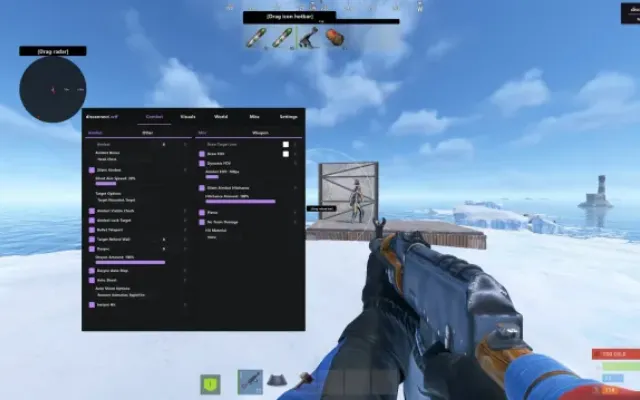
Перед покупкой: что значат статусы читов, как проверить системные требования, как купить чит. Смотрите также все читы для Rust.