MASON-Radar
ОПИСАНИЕ
Here is the full translation of the feature list into English.
Main
Show Resources: (Wood, stone, ore, etc.)
Show Mobs
Show Players
Show NPCs
Show Chests
Show Mists
Show Mounts
Object Counter: Displays the count of objects on the radar broken down by type (CHEST, MOB, HARV, etc.)
Distance Filter: Set minimum/maximum distance (objects outside this range are hidden)
Sound Notifications: Alerts when detecting various object types (players, chests, resources)
Nearest Object Tracker: Automatically detects and displays info about the object closest to the player
Export Coordinates: Saves coordinates of all discovered objects to a text file (Hotkey: F3)
Discovery History: Tracks history of found objects with timestamps
Hotkeys:
F1: Menu
F2: Save
F3: Export coordinates
Auto-Save Config: Automatically saves settings every 30 seconds
Show Distance: Displays distance to radar objects in meters
Player Proximity Warning: Sound alert when other players approach a set distance
Object Grouping: Groups objects by type for easier analysis
Direction Indicator: Shows direction on the radar
Auto-Hide: Automatically hides objects outside the scan radius
Detection Statistics: Tracks stats (Time of first/last detection, total count)
Advanced Sound Alerts: Distinct sounds for different types (Chests, Resources, Players)
Visual Indicators: Pulsing circles for high-value objects (Chests, Artifacts)
Priority System: Sorts objects by importance (Chests = Highest priority)
Object Caching: Optimizes performance
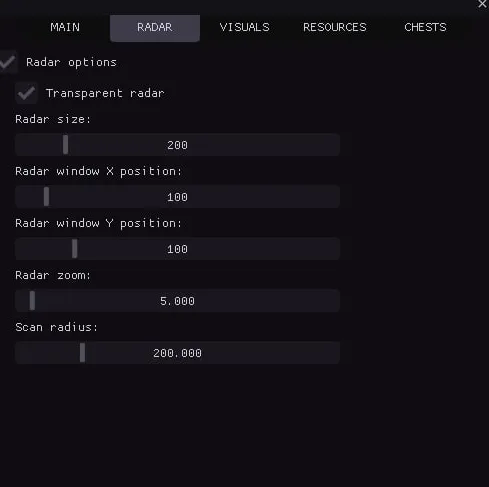
Radar
Radar Options
Transparent Radar: Adjust opacity
Radar Size
Radar X Position
Radar Y Position
Radar Zoom: Zoom in/out
Scan Radius: Set distance for object scanning
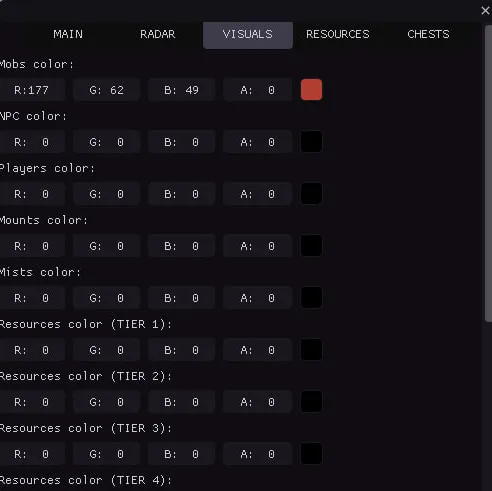
Visuals Colors
Mobs Color
NPC Color
Players Color
Mounts Color
Mists Color
Resources Tier 1–8 Color: (Individual color settings for each tier)
Chests Color
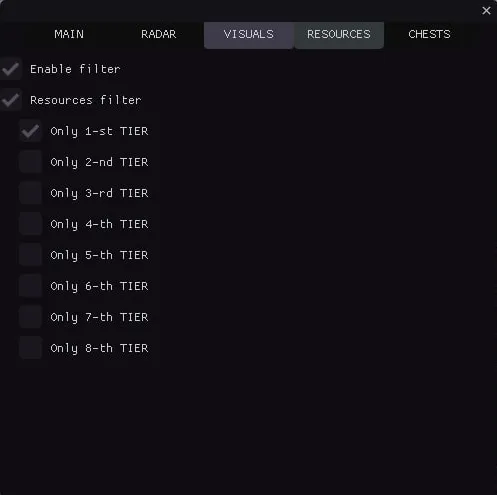
Resources
Enable Filter
Resources Filter:
Only Tier 1 Items
Only Tier 2 Items
Only Tier 3 Items
Only Tier 4 Items
Only Tier 5 Items
Only Tier 6 Items
Only Tier 7 Items
Only Tier 8 Items
Chests
Chests Filter:
Only Tier 1 Chests
Only Tier 2 Chests
Only Tier 3 Chests
Only Tier 4 Chests
Visual Effects
Snaplines: Lines from radar center to objects for better visualization
Movement Trails: Shows object movement paths with adjustable length
Scan Zone: Visualizes the scanning area
Color Gradients: Gradient coloring for objects
Object Animations: Pulsing effects with adjustable speed
Shadows: Depth effect under objects
Glow Effects: Aura around objects
Radar Grid: Coordinate grid for orientation
Zone Boundaries: Visual radar borders with corner markers
Directional Arrows: Pointers indicating object direction
Object Icons: Unique icons for different types
Gradient Lines: Lines with smooth color transitions
Object Outlines: Contours with adjustable thickness
Hover Highlight: Highlights objects when moused over
Distance Rings: Concentric circles to visualize range
Particle Effects: Particles around VIP objects (Chests, Artifacts)
Visual Markers: Star markers for important objects
Pulsating Effects: Object pulsation
3D Depth Effect: Visual depth for objects on radar
Program functionality may change at any time at the developer's discretion, though we always strive to keep information up to date.
ФУНКЦИИ
СИСТЕМНЫЕ ТРЕБОВАНИЯ
Нет
Античит:
BATTLEYE
Обход записи в ОБС:
Да
Поддерживаемые режимы игры:
Все
Поддерживаемые процессоры:
Intel и AMD
Поддерживаемые системы:
Windows 10 x64 (2004, 20H2, 21H1, 21H2, 22H2)