Crooked Arm's
ОПИСАНИЕ
Here is the translation of the feature list into English. Judging by the specific terms like "ARC robots," "Raiders," and "Supply Call Station," this software is likely for The Cycle: Frontier (or Arc Raiders).
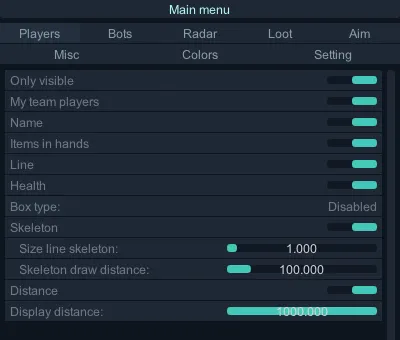
Visual
Only Visible: Show only visible players
My Team Players: Show teammates
Name: Show player names
Line: Show snaplines to players
Armor & Health: Show player armor and health levels
Box Type: Select player box style
Disabled
Box 2D
Box 3D
Skeleton: Show player skeleton
Skeleton Line Thickness: Adjust thickness
Skeleton Draw Distance: Max render distance for skeletons
Distance: Set max render distance for players
Display Distance: Set max render distance for other objects
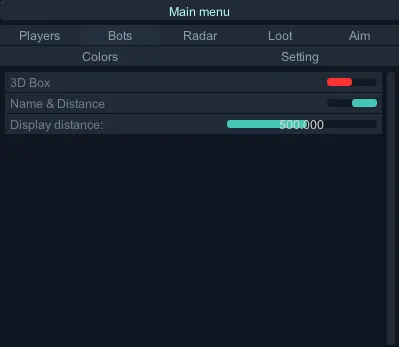
Bots
Show Vulnerable Parts: Highlight weak spots
3D Box: Draw 3D box around bots
Name & Distance: Show name and distance
Display Distance: Set max render distance for bots
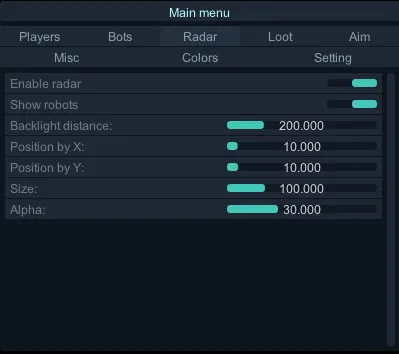
Radar
Enable Radar: Turn on 2D Radar
Show Robots: Show bots on radar
Backlight Distance: Set radar scanning range
Position by X: Horizontal position
Position by Y: Vertical position
Size: Radar size
Alpha: Radar transparency
Loot
Containers: Toggle specific container types:
Raiders, ARC, Activity, Backpacks, Ammo Boxes, Weapon Cases, Grenade Containers, Medical Bags, Other.
Display Distance for Containers: Set max render distance for containers
Item Categories: Toggle specific item types:
Launcher, Rifle, Consumable, Throwable, Deployable, Modification, Gadget, Armor, Crafting Reagent, Backpack, Crafting Part, Misc, Melee Weapon, Generator, Currency, Recipe, Meta Item, Unarmed, Augment.
Use Item Rarity Color: Color items based on their in-game rarity
Limit by Rarity Level: Filter items by rarity
Note: Items with unknown rarity will be grouped with the highest rarity category.
Show Item Count: Show stack size (if applicable)
Display Distance: Set max render distance for items
Aim
Enable Human Aimbot (Danger): Enable Aimbot
Visibility Check: Ensure target is visible before locking
Aiming at ARC Robots: Enable aimbot for robots
Aiming at Knocked Players: Enable aimbot for downed players
Lock Target: Lock onto the current target
Target Switch Delay (ms): Delay before switching to a new target
AIM Preset: Select a pre-configured aim behavior:
Beginner: Twitchy, uncertain, mimics a new player. Good for easy bots.
Intermediate: Balanced and natural. Good aim, but not "pro" level.
Pro: High accuracy, human-like reaction. For elite bots or hardcore PVP.
Rage: Maximum speed and accuracy.
Custom: Unlocks all manual settings (Smooth, Jitter, Inertia, etc.).
Distances for Smooth / Jitter: Set distance thresholds for smoothing settings
Smooth: Aiming speed/drag. Higher values = slower, smoother movement.
Jitter: Adds random micro-movements to mimic human hand instability.
Inertia: Controls movement momentum (Higher = smoother start/stop, Lower = snappier).
Overshoot Chance: Probability that the crosshair will initially move past the target.
Overshoot Amount: How far past the target the crosshair will go.
Micro Pause Chance: Probability of a short pause during aiming (mimics human reaction time).
Draw FOV Circle: Visual Aimbot FOV
FOV: Set Aimbot radius
Distance: Set Aimbot max range
Bones Selection: Select target body parts (Multi-select available):
Head, Neck, Elbows (L/R), Body, Pelvis, Knees (L/R).
Hotkey Selection: Set activation key (Must be held down).
Colors
Customize Colors for:
Visible/Invisible Players
Teammates
Target Player
Loot Categories: Containers, Launchers, Rifles, Consumables, Throwables, Deployables, Modifications, Gadgets, Armor, Reagents, Backpacks, Parts, Misc, Melee, Generators, Currency, Recipes, Meta Items, Unarmed, Augments.
Misc
Active Grenades & Mines: Show live explosives
Field Crate: Show Field Crates
Supply Call Station: Show Supply Call Stations
Setting
Key to Disable Loot: Hotkey to toggle loot ESP
Open Menu Key: Hotkey to open/close menu (Default: "HOME")
Program functionality may change at any time at the developer's discretion, though we always strive to keep information up to date.
ФУНКЦИИ
СИСТЕМНЫЕ ТРЕБОВАНИЯ
Steam, xbox
Встроенный спуфер:
Нет
Античит:
Внутриигровой
Обход записи в ОБС:
Да
Поддерживаемые режимы игры:
Оконный
Поддерживаемые процессоры:
AMD&Intel
Поддерживаемые системы:
Windows 10 , Windows 11 (1903-25H2)