Call of Duty: BO7 | Warzone Crooked Arm's
ОПИСАНИЕ
Players
Only Visible: Show only visible players
My Team Players: Show teammates
Name: Show player names
Team: Show player team
Health: Show player health
Weapon in Hands: Show held weapon
Line: Show snaplines to players
Box 2D: Show 2D box around players
Distance: Set max render distance for players
Direction of View: Show player gaze direction
Skeleton: Show player skeleton
Size Line Skeleton: Set skeleton line thickness
Skeleton Draw Distance: Set max render distance for skeletons
Additional Distance: Set extra render distance
Draw Distance: Set general render distance
Radar
Show Players/AI on World Map & Minimap: Unlocks radar on the in-game map (Permanent UAV)
Use Team Color: Use team colors
Enable Radar: Turn on custom 2D Radar overlay
Backlight Distance: Set radar scanning range
Size: Set radar display size
Position by X: Horizontal position
Position by Y: Vertical position
Alpha: Radar transparency
Aim
Enable Human Aimbot: Turn on "Humanized" Aimbot
Aim at Bots: Target AI/Bots
Aim at Knocked Players: Target downed players
Visibility Check: Ensure target is visible before locking
Lock Target: Lock onto current target
Target Switch Delay: Time delay before switching to a new target
AIM Preset: Select pre-configured aim behaviors:
Beginner: Twitchy, uncertain, mimics a new player. Good for easy bots.
Intermediate: Balanced and natural. Good aim, no high-skill snapping.
Pro: High accuracy, human-like reaction. For elite bots or hardcore PVP.
Rage: Maximum speed and accuracy.
Custom: Unlocks manual settings (Smooth, Jitter, Inertia, etc.).
Distances for Smooth / Jitter: Set distance thresholds for smoothing settings
Smooth: Aiming speed/drag. Higher values = slower, smoother movement.
(Green slider = Close range, Red slider = Far range)
Jitter: Random micro-movements to mimic human hand instability.
Inertia: Controls movement momentum (Higher = smoother start/stop, Lower = snappier).
Overshoot Chance: Probability that the crosshair will initially move past the target.
Overshoot Amount: How far past the target the crosshair will go.
Micro Pause Chance: Probability of a short pause (mimics human reaction time).
Draw FOV Circle: Visual Aimbot FOV
FOV: Set Aimbot radius
Distance: Set Aimbot max range
Bones Selection: Select target body parts (Multi-select available):
Head, Neck, Elbows (L/R), Body, Pelvis, Knees (L/R).
Hotkey Selection: Set activation key (Must be held down).
Loot
Weapons: Show weapons
Ammo: Show ammunition
Tactical: Show tactical equipment
Combat: Show lethal equipment
Support: Show support items (Ammo/Armor boxes)
Armor: Show armor plates
Money: Show cash
Containers: Show backpacks, bags, crates
Field Modification: Show Field Upgrades
Series of Murders: Show Killstreaks
Perks: Show perks
Improvement: Show upgrades/self-revive kits
Kiosk, Tablet, etc.: Show Buy Stations, Contracts
Other: Show misc items
Use Item Rarity Color: Color items by rarity
Display Distance: Set max render distance for loot
Colors
Customize Colors for:
Friends, Enemy Bots, Enemy Players, Knocked Enemies.
Visible vs Hidden Enemies, Target Color.
Loot: Weapons, Armor Plates, Ammo, Tactical Gear, Combat Gear, Money, Survival Kits, Containers, Killstreaks, Field Upgrades, Keys/Keycards.
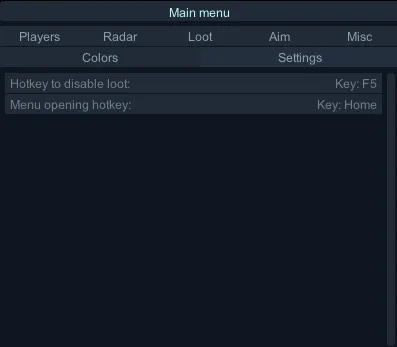
Settings
Key to Disable Loot: Hotkey to toggle loot ESP
Open Menu Key: Hotkey to open/close menu (Default: "HOME")
Misc
Draw Weapons (in Multiplayer, etc.): Show dropped weapons
Display Distance: Set max render distance
Draw Active Explosives, Field Modifications: Show live grenades/mines
Only Enemy Items: Show only hostile explosives
Show Item Name: Show name
Display Distance: Set max render distance
Draw Vehicles: Show vehicles
Display Distance: Set max render distance
ФУНКЦИИ
СИСТЕМНЫЕ ТРЕБОВАНИЯ
STEAM и BATTLE.NET
Встроенный спуфер:
Нет
Античит:
Внутриигровой
Обход записи в ОБС:
Да
Поддерживаемые режимы игры:
Оконный
Поддерживаемые процессоры:
Intel и AMD
Поддерживаемые системы:
Windows 10 , Windows 11 (1903-25H2)