Desync EFT
ОПИСАНИЕ
AIMBOT
- Mode - Select AIMBOT mode
- Key – AIM key
- Auto switch - auto change target after killing
- Smooth - smooth aiming of the aimabot
- Spot - shows where the aim spot is now
- FOV – AIM radius
- Show FOV - draws a radius
- Show Spot - draws an aim marker
- Show current aim bone – Display the name of the bone being targeted
- Legs for nearest bone – Enable aiming at legs (additionally) for the nearest bone
- Silent AIM – don`t need aiming target
ESP
- Show Visuals – Enable Wallhack features
- Box – Draw a box
- Bone – Render skeleton
- Name – Display enemy names
- Exits – Show exits
- Grenades – Show grenades
- Player Price – Display player inventory value
- Level – Display player level
- Snipe zone – Mark sniper zones
- Weapon – Display weapon in player's hands
- Mines – Draw mines
- Enemy armor – Display enemy armor
- Enemy ammo – Display enemy ammunition
- Head outline – Highlight head
- Players on map – List players on the map
- Bear \ Usec – Show faction
- K/D rate – Display kill/death ratio
- Bot name – Display bot names
- Distance – Calculate distance to players
- Snapline – Useless lines to players
- Turn off info (top left corner) – Remove additional information
- Max. Distance – Select ESP function working distance
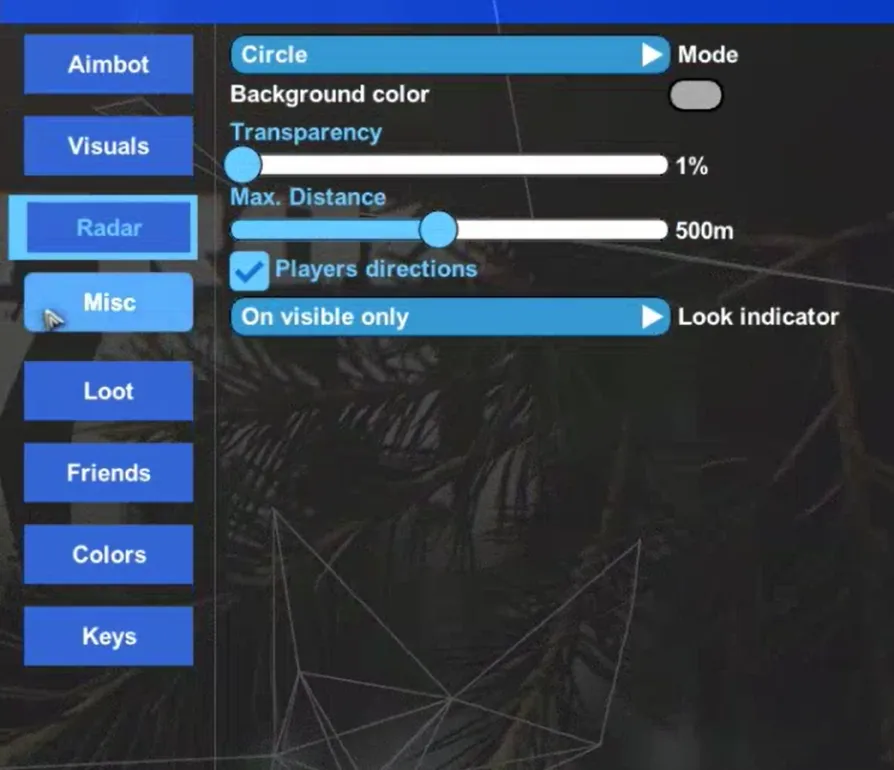
RADAR
- Mode – Select mode
- Color – Background color
- Transparency – Transparency
- Max. Distance – Select working distance
- Players' perspective – Players' view on the radar
- Gaze indicator – Shows if the enemy is looking at you
MISC
- Crosshair – Additional crosshair from the cheat
- Border – Radar border selection
- Radar – Radar
- My Ammo – Display ammo type and quantity in the magazine
- No recoil + No breath + No sway – Disable shake, weapon sway, and recoil
- No visor – Remove visor
- Infinity stamina – Infinite stamina
- Thermal visor – Night vision
- Loot through walls – Loot through walls up to 4 meters
- Chams – Colored player models
- Quest items – Display quest items
- Quest marks \ places – Display quest locations
- Quest full info – Quest hints
- Always daytime – Always daytime on the location (visible only to you)
- Skip examining – Skip item examination (everything is learned)
- Fast search – Fast search on the enemy
Loot
- Open custom loot filter – Open manual loot filter
- Show Items – Display items
- Show loot in containers – Display loot in containers (bags, caches, etc.)
- Show loot in dead boxes – Display loot in corpses
- Show 'found in raid' – Show if the item was found in raid or not
- Show full weapon price – Display weapon price
- Show drink/food (15%) – Display food/water if levels are below 15%
- Collapse container child – Show container contents only on hover
- Show debug items – Debug (generally not important for users)
- Show all keys – Display all keys
- Show all medicine – Display all medicines
- Show best loot – Display the best loot on the map
- Sort by price – Display by item price
- Sort by slot – Display by price per slot
- Min. Item price – Minimum item price
- Max. Item distance – Item distance
- Max. Container distance – Container distance
Friends
- Add friend - add a friend (adds exceptions to AIMBOT)
- Remove friend - remove a friend
Keys
- Keys – button settings tab
- Panic key – emergency shutdown of visuals
- Show loot key – on / off display of loot
- Thermal vision key - on / off thermal vision
- Switch aim spot key – change the aim point
- Unload key – unload hack
- Font size – font size selection
- Font name - font selection
- Save config – saving settings \ config
ФУНКЦИИ
СИСТЕМНЫЕ ТРЕБОВАНИЯ
Steam и Launcher
Встроенный спуфер:
Да
Античит:
Внутриигровой
Обход записи в ОБС:
Да
Поддерживаемые режимы игры:
Оконный, Безрамочный, Полноэкранный
Поддерживаемые процессоры:
Intel и AMD
Поддерживаемые системы:
Windows 10 (21H2, 22H2), Windows 11(22H2,23H2)