MASON Full
ОПИСАНИЕ
AIMBOT
Aim Enable: Turn on Aimbot
Aim Spot: Select target body part
Aim Key: Set aimbot activation key (must be held down)
Aim Radius: Set aimbot FOV radius
Aim Height: Adjust aimbot targeting height
Silent Aim: Turn on Silent Aimbot (Shoots targets without moving your crosshair)
Manipulate Left & Right: Allows offsetting the bullet spawn point (e.g., around walls) to kill enemies without exposing yourself.
VISUALS
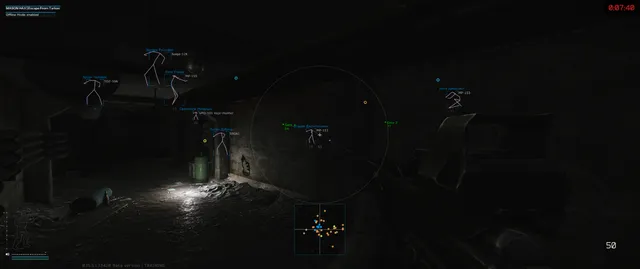
Visuals Enable: Turn on Visuals
Show Players
Show Bounding Box: Display 2D boxes
Show Skeleton
Show Health: Display health level
Show Name
Show Weapon
Player Render Distance: Set max distance for player ESP
WORLD
Show Mines
Show Grenades
Show Extractions: Show exit points
Show Ammo Indicator: Display current ammo count
LOOT ESP
Show Loot: Show items
Loot Price: Set minimum price/value for displayed items
Loot Render Distance: Set max distance for items
Show Containers
Show Barter Loot: Show trade items
Show Ammunition
Show Provision: Show food and water
Show Special Loot: Display specific loot from the "Special" filter
Show Custom Loot: Display items from the user's custom filter
MISC
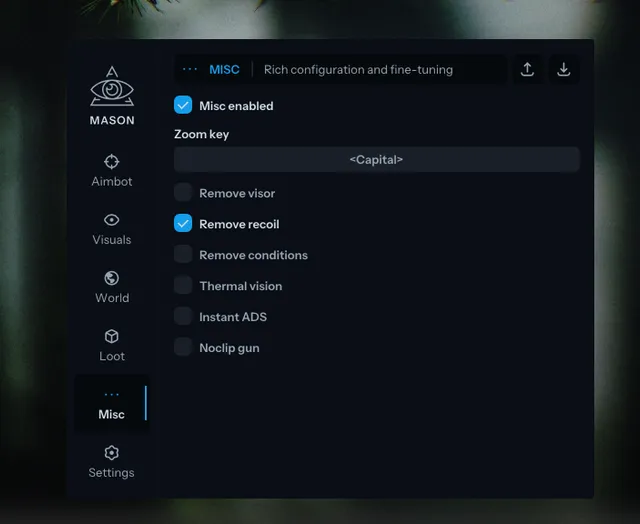
Misc Enable: Turn on Misc features
Zoom Key: Set key for zoom (functions like binoculars)
Remove Visor: Disable helmet visor effects (cracks/dirt)
Remove Recoil: No Recoil
Remove Conditions: Remove negative status effects (e.g., pain, tremors, broken legs)
Thermal Vision: Enable thermal vision
Instant ADS: Fast Aim Down Sights
Noclip Gun: Allows the weapon barrel to clip through walls (prevents the gun from lifting up when too close to an obstacle)
SETTINGS
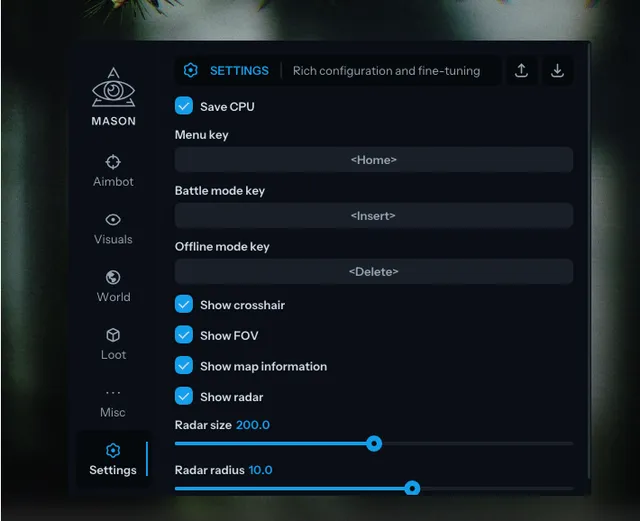
Save CPU: CPU resource optimization system
Menu Key: Set menu toggle key (Default: "Home")
Battle Mode Key: Key to toggle Battle Mode (disables all non-essential visuals for combat clarity)
Offline Mode Key: Key to activate Offline Mode
Show Crosshair: Display crosshair in center of screen
Show FOV: Display aimbot radius circle
Show Map Information
Show Radar: Display 2D Radar
Radar Size: Set radar display size
Radar Radius: Set radar scanning range
Program functionality may change at any time at the developer's discretion, though we always strive to keep information up to date.
ФУНКЦИИ
СИСТЕМНЫЕ ТРЕБОВАНИЯ
Нет
Античит:
BATTLEYE
Обход записи в ОБС:
Да
Поддерживаемые режимы игры:
Оконный, Полноэкранный, Полноэкранный в окне
Поддерживаемые процессоры:
Intel и AMD
Поддерживаемые системы:
10 Windows x64 (2004 / 20H2 / 21H1 / 21H2 / 22H2), Windows 11 x64 (21H2 / 22H2 / 23H2)