MASON
ОПИСАНИЕ
AIMBOT
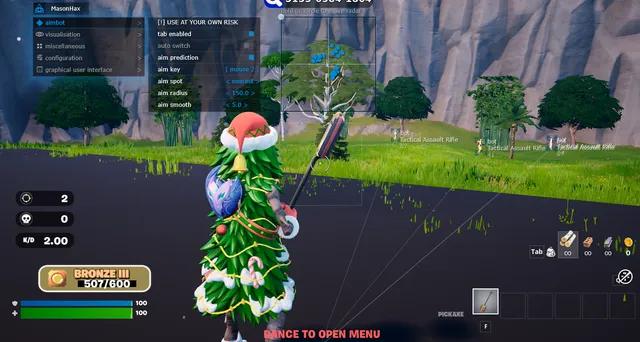
Tab Enabled: Turn on Aimbot
Aim Key: Set Aimbot activation key
Aim Radius: Set Aimbot FOV (Field of View) radius
Aim Smooth: Adjust Aimbot smoothing
Aim Prediction: Enable movement prediction (leads the target)
Aim Spot: Select target body part (bone)
Auto Switch: Automatically switch to the next target within the Aimbot radius
VISUALISATION
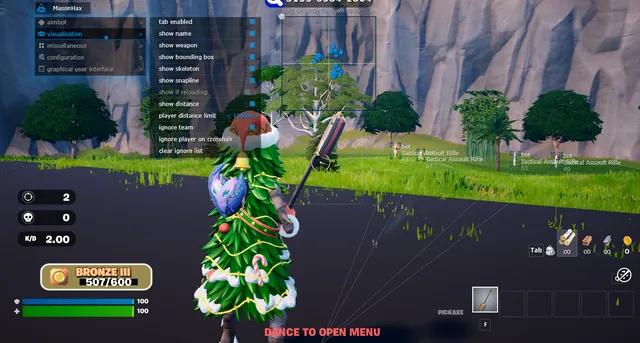
Tab Enabled: Turn on ESP
Show Bounding Box: Display 2D box around enemies
Show Skeleton: Display enemy skeleton
Show if Reloading: Display a warning when an enemy is reloading
Show Snapline: Draw lines to enemies
Show Name: Display enemy class/name
Show Weapon: Display enemy's current weapon
Show Distance: Display distance to enemy
Ignore Team: Do not show teammates
Player Distance Limit: Set maximum render distance for players
MISCELLANEOUS
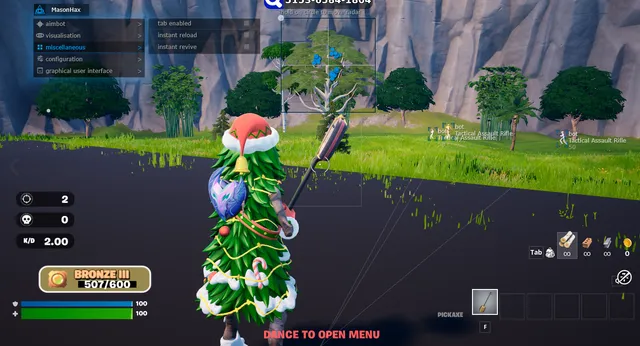
Tab Enabled: Turn on Misc features
Instant Reload: Reload weapon instantly
Instant Revive: Revive teammates instantly
CONFIGURATION
Save CPU: CPU resource optimization
Panic Key: Emergency button to immediately disable the cheat
Menu Key: Key to open the menu
Battle Mode Key: Key to toggle "Battle Mode" (shows only players, hides other visuals)
Load Config from Clipboard: Import settings
Save Config to Clipboard: Export settings
GRAPHICAL USER INTERFACE
Show Aim Radius: Visual circle showing Aimbot FOV
Show Crosshair: Display crosshair in center of screen
Show Radar: Display 2D Radar
Radar Size: Set radar display size
Radar Radius: Set radar scanning range
Program functionality may change at any time at the developer's discretion, though we always strive to keep information up to date.
ФУНКЦИИ
СИСТЕМНЫЕ ТРЕБОВАНИЯ
Supported game mode: Windowed / Fullscreen
Supported Windows OS: 10 & 11 x64, versions (2004 / 20H2 / 21H1 / 21H2 / 22H2 / 23H2 / 24H2 / 25H2 / 26H1). Optional support for Windows 11 version 24H2, functionality not guaranteed
Supported anti-cheat: Easy Anti-Cheat
Supported processors: Intel and AMD
Support for invisibility in videos or screenshots: Yes
BIOS boot mode: UEFI
System disk boot record format: GPT
Additional Windows system requirements: Enable VT-x / VT-d (Virtualization) / Enable Hyper-V / Disable Secure Boot
USB flash drive required: Yes