FOCUS Squad
GAME: Squad
UNDETECTED
ОПИСАНИЕ
FOCUS Squad для Squad: характеристики, системные требования и доступные сроки подписки. Перед покупкой проверьте ограничения и выбранный тариф.
ФУНКЦИИ
Aimbot
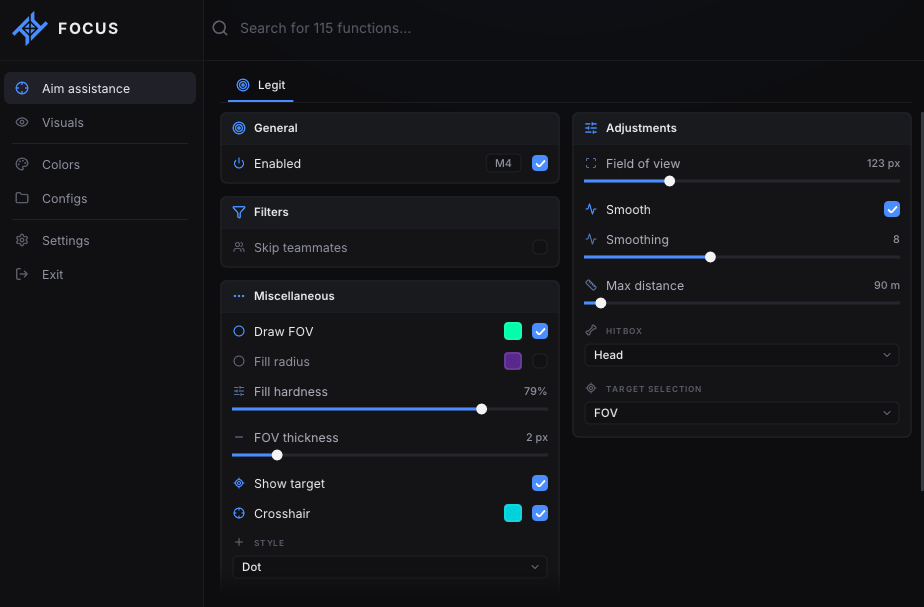
- Enabled — Master switch + bind on the same row. Default bind: Mouse 4 (MouseX1).
- Field of view — Range: 20 px to 400 px. Default: 140 px.
- Smooth — Turns smoothing on/off independently of the slider. On by default.
- Smoothing — Range: 0 to 20. Default: 2. Only used when Smooth is on.
- Max distance — Range: 50 m to 800 m. Default: 400 m.
- Hitbox — Head; Chest; Closest — picks the nearest bone to the crosshair
- Target selection — FOV — closest to crosshair inside the FOV circle (default); Distance — closest in world meters
- Skip teammates — Never aims at your own team. On by default.
- Draw FOV — FOV circle. Color picker on the same row.
- Fill radius — Filled FOV disc. Color picker. Off by default.
- Fill hardness — Range: 0% to 100%. Default: 25%.
- FOV thickness — Range: 1 px to 8 px. Default: 2 px.
- Show target — Highlights the current aim target. On by default.
- Crosshair — Custom overlay crosshair. Color picker on the same row. On by default.
- Style — Cross; Plus; Dot (default); T
- Size — Range: 1 px to 24 px. Default: 6 px.
- Gap — Range: 0 px to 20 px. Default: 2 px.
- Thickness — Range: 1 px to 4 px. Default: 1 px.
ESP · Players
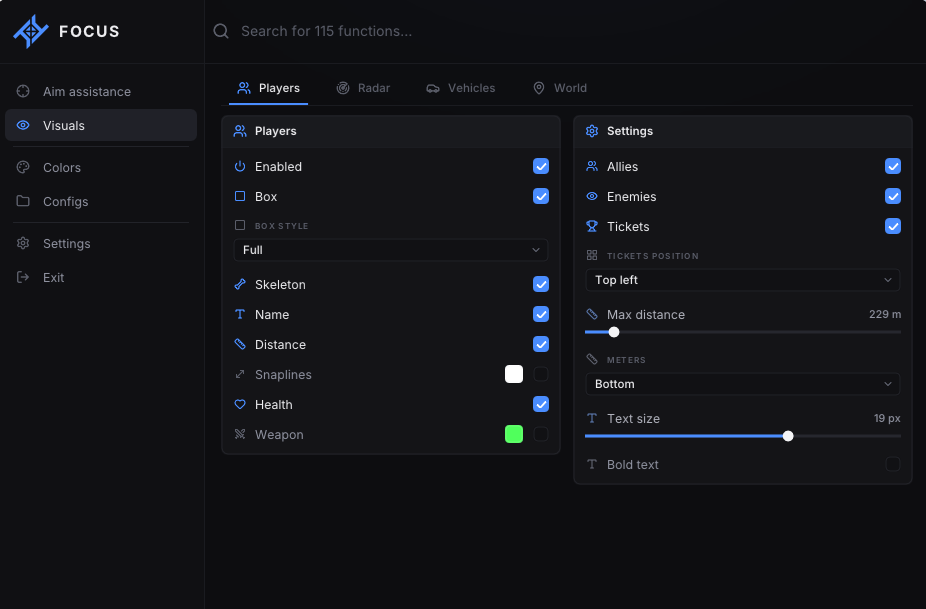
- Enabled — Master switch for player ESP.
- Box — Bounding box.
- Box style — Corners (default); Full
- Skeleton — Bone overlay. Off by default.
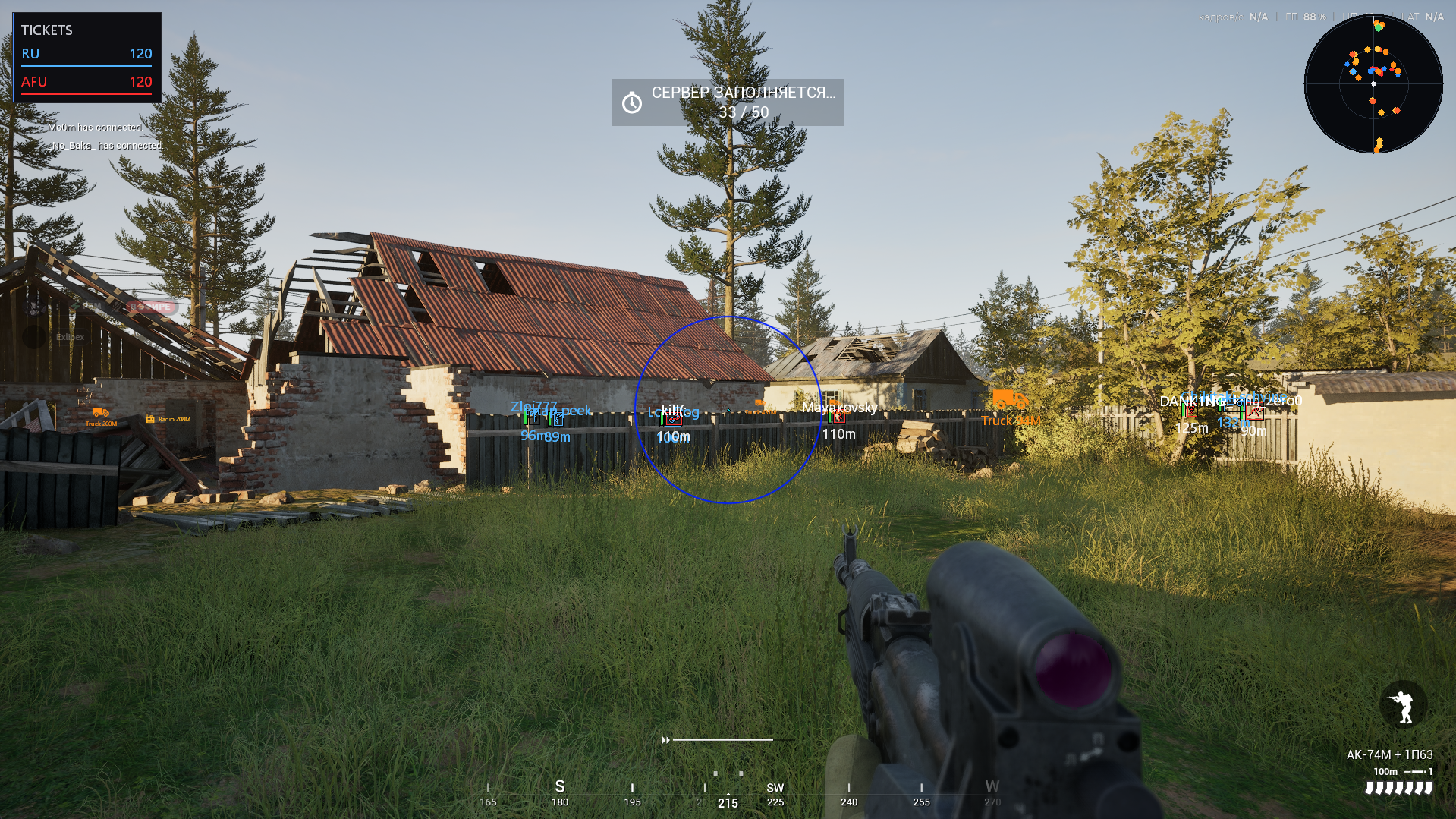
- Name — Player name.
- Distance — Distance in meters.
- Snaplines — Line toward the player. Color picker on the same row. Off by default.
- Health — Health on the player.
- Weapon — Weapon the player is holding. Color picker on the same row.
- Allies — Draw teammates. On by default.
- Enemies — Draw enemies. On by default.
- Tickets — Team ticket overlay on screen. On by default.
- Tickets position — Top left (default); Top center; Top right; Bottom left; Bottom center; Bottom right
- Max distance — Range: 50 m to 2000 m. Default: 800 m.
- Meters — Top / Bottom / Side / Right of name.
- Text size — Range: 10 px to 24 px. Default: 13 px.
- Bold text — Off by default.
Radar
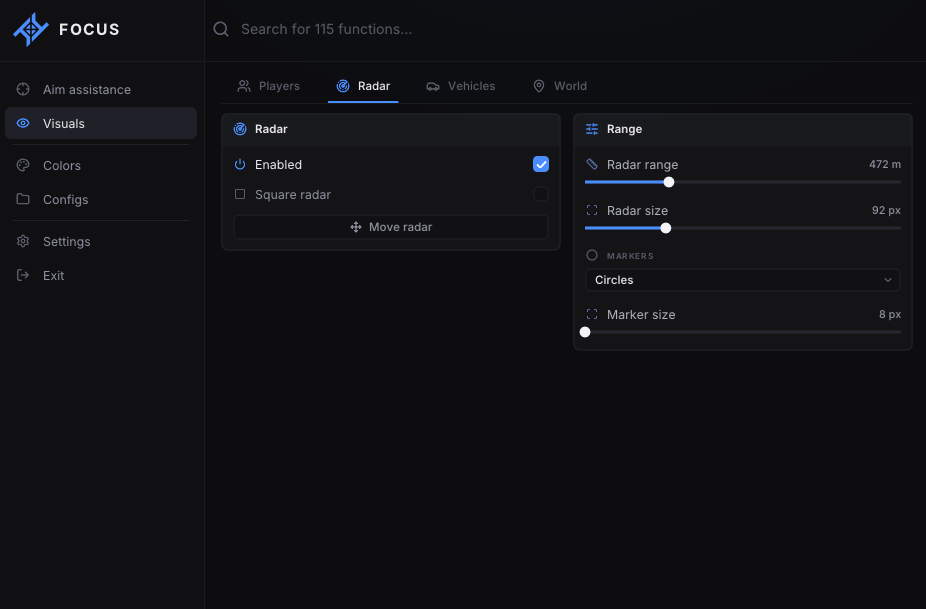
- Enabled — Master switch for 2D radar.
- Square radar — Square radar frame. Off by default.
- Move radar — Button. Drag the radar on screen.
- Radar range — Range: 100 m to 1500 m. Default: 400 m.
- Radar size — Range: 48 px to 220 px. Default: 92 px.
- Markers — Circles; Icons (default)
- Marker size — Range: 8 px to 32 px. Default: 10 px.
ESP · Vehicles
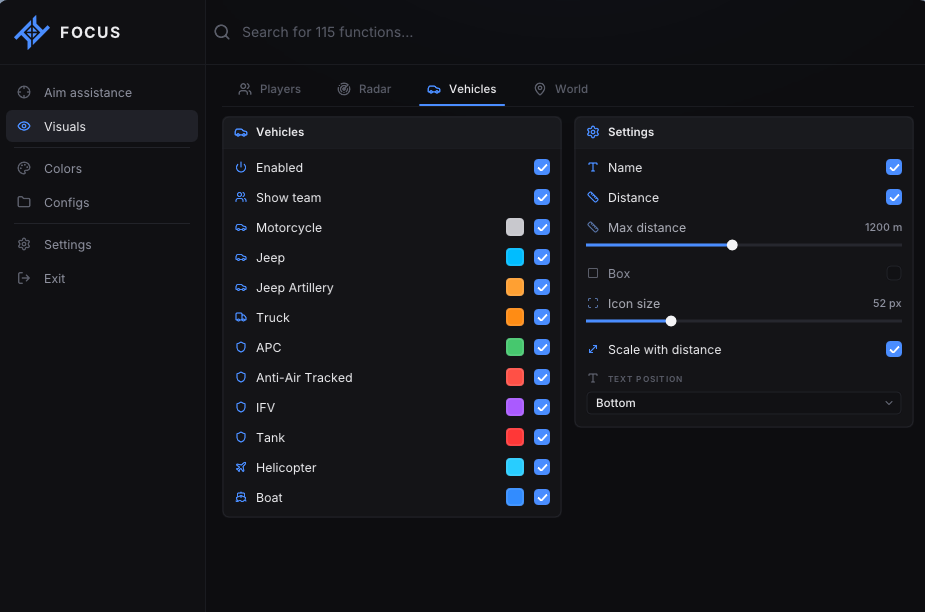
- Enabled — Master switch for vehicle ESP.
- Show team — Also show friendly vehicles. On by default.
- Motorcycle — Category toggle + color.
- Jeep — Category toggle + color.
- Jeep Artillery — Category toggle + color.
- Truck — Category toggle + color.
- APC — Category toggle + color.
- Anti-Air Tracked — Category toggle + color.
- IFV — Category toggle + color.
- Tank — Category toggle + color.
- Helicopter — Category toggle + color.
- Boat — Category toggle + color.
- Name — Vehicle name on screen.
- Distance — Distance to the vehicle.
- Max distance — Range: 80 m to 2500 m. Default: 1200 m.
- Box — Box around the vehicle. Off by default.
- Icon size — Range: 24 px to 128 px. Default: 64 px.
- Scale with distance — Icons shrink as the vehicle gets farther. Off by default.
- Text position — Side (default); Top; Bottom
ESP · Deployables
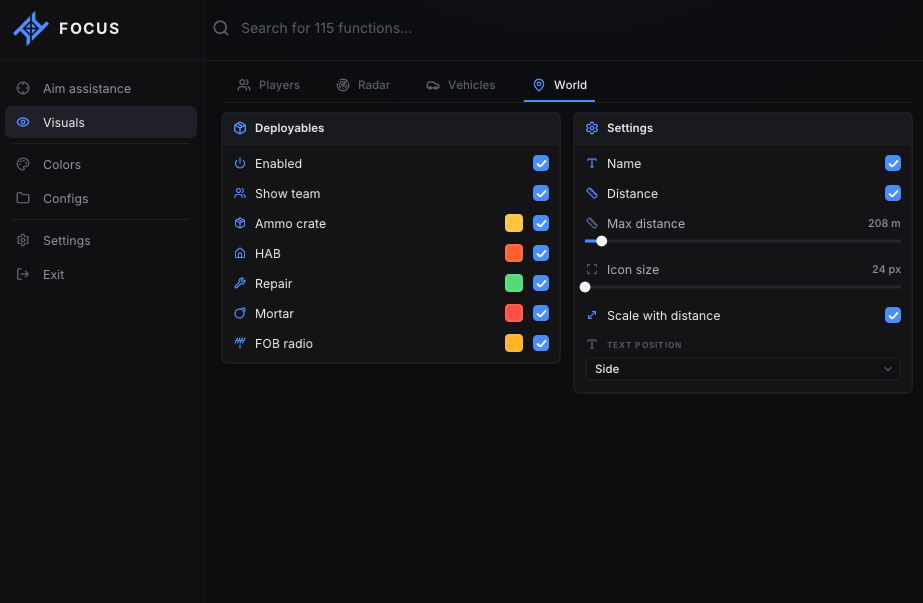
- Enabled — Master switch for deployable / world ESP.
- Show team — Also show friendly deployables. On by default.
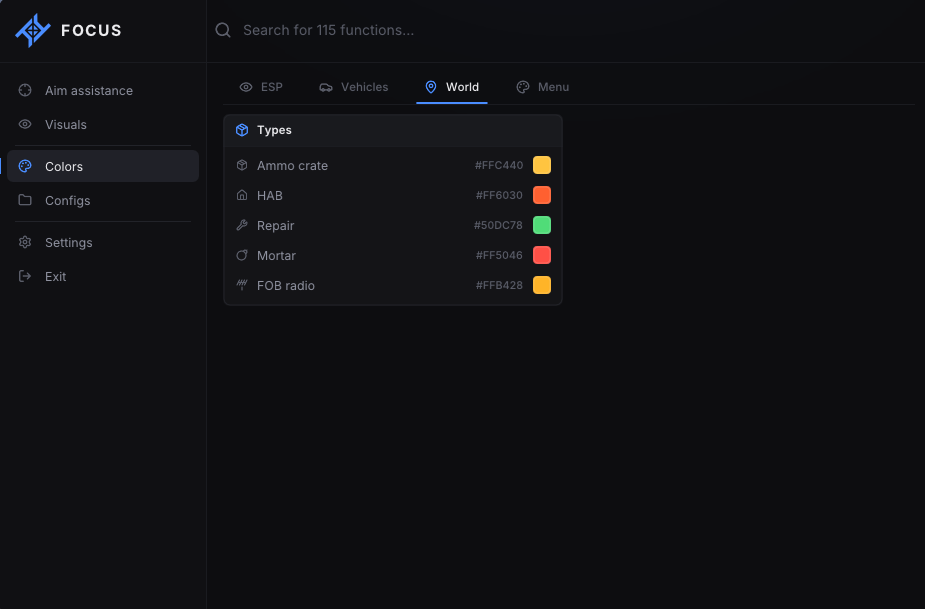
- Ammo crate — Category toggle + color.
- HAB — Category toggle + color. Squad hab / spawn bunker.
- Repair — Category toggle + color. Repair station.
- Mortar — Category toggle + color.
- FOB radio — Category toggle + color.
- Name — Deployable name.
- Distance — Distance to the object.
- Max distance — Range: 80 m to 2500 m. Default: 400 m.
- Icon size — Range: 24 px to 128 px. Default: 64 px.
- Scale with distance — Icons shrink with range. Off by default.
- Text position — Side / Top / Bottom.
Colors · ESP
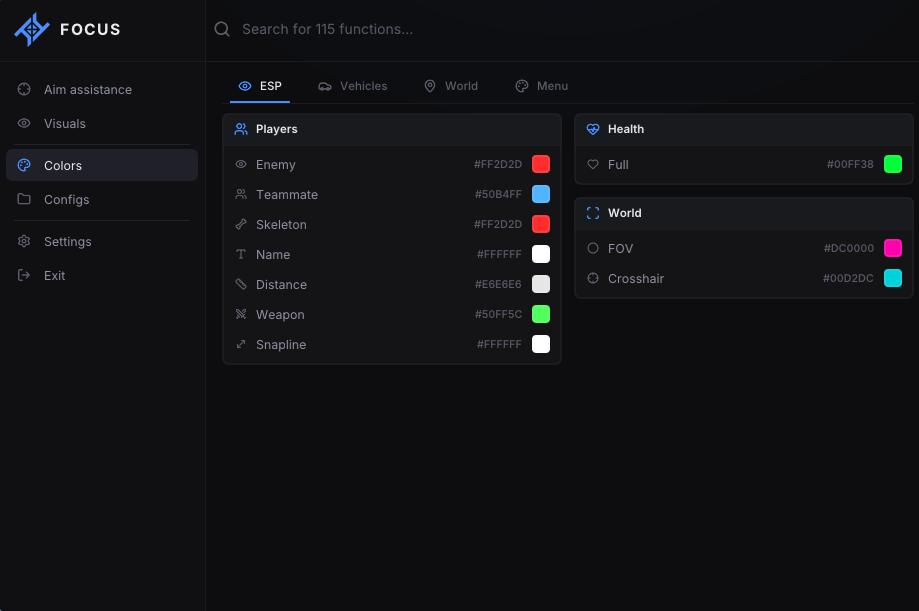
- Enemy — Enemy ESP color.
- Teammate — Teammate ESP color.
- Skeleton — Skeleton color.
- Name — Name color.
- Distance — Distance color.
- Weapon — Weapon text color.
- Snapline — Snapline color.
- Full — Health color at full HP.
- FOV — Aim FOV circle color.
- Crosshair — Overlay crosshair color.
Colors · Vehicles
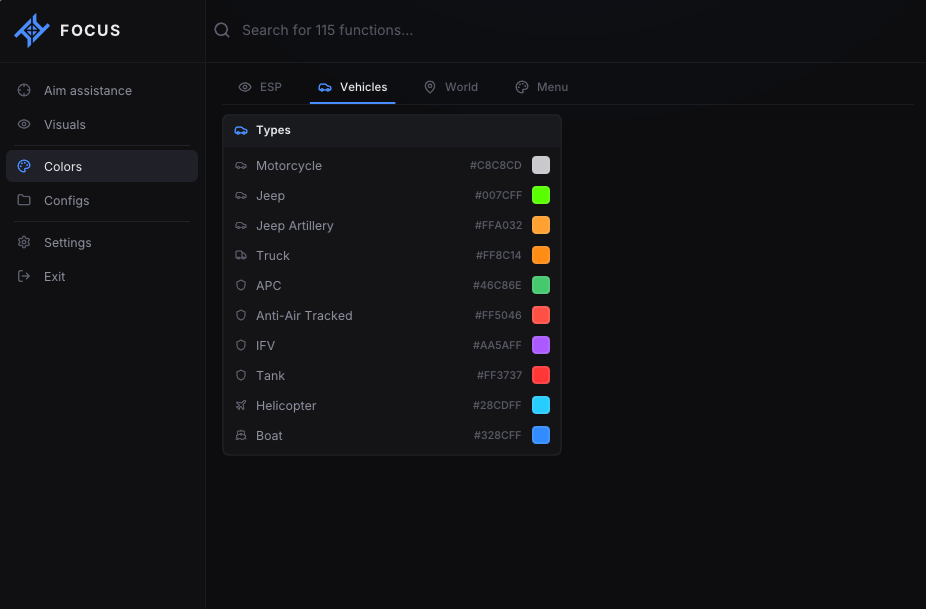
- Motorcycle — Independent color for each vehicle type.
- Jeep — Independent color for each vehicle type.
- Jeep Artillery — Independent color for each vehicle type.
- Truck — Independent color for each vehicle type.
- APC — Independent color for each vehicle type.
- Anti-Air Tracked — Independent color for each vehicle type.
- IFV — Independent color for each vehicle type.
- Tank — Independent color for each vehicle type.
- Helicopter — Independent color for each vehicle type.
- Boat — Independent color for each vehicle type.
Colors · Deployables
- Ammo crate — Independent color for each deployable type.
- HAB — Independent color for each deployable type.
- Repair — Independent color for each deployable type.
- Mortar — Independent color for each deployable type.
- FOB radio — Independent color for each deployable type.
Menu appearance
- Preset — Focus blue / Violet / Cyan / Mint / Rose / Amber.
- Accent color — Custom menu accent.
Menu settings
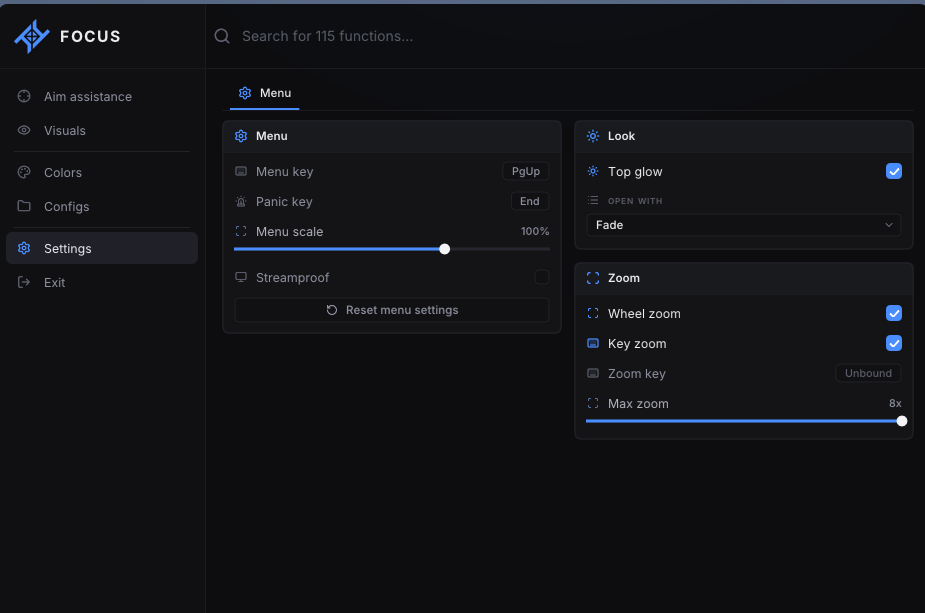
- Menu key — Default: Home.
- Panic key — Default: End.
- Menu scale — 60% to 120%. Default 100%.
- Streamproof — On by default.
- Reset menu settings — Reset menu settings.
- Top glow — On by default.
- Open with — Fade / Slide / None.
- Wheel zoom — Scroll-wheel zoom while playing. On by default.
- Key zoom — Zoom while holding a key. On by default.
- Zoom key — Default: Mouse 5 (MouseX2).
- Max zoom — Range: 1x to 8x. Default: 3x.
Configuration profiles
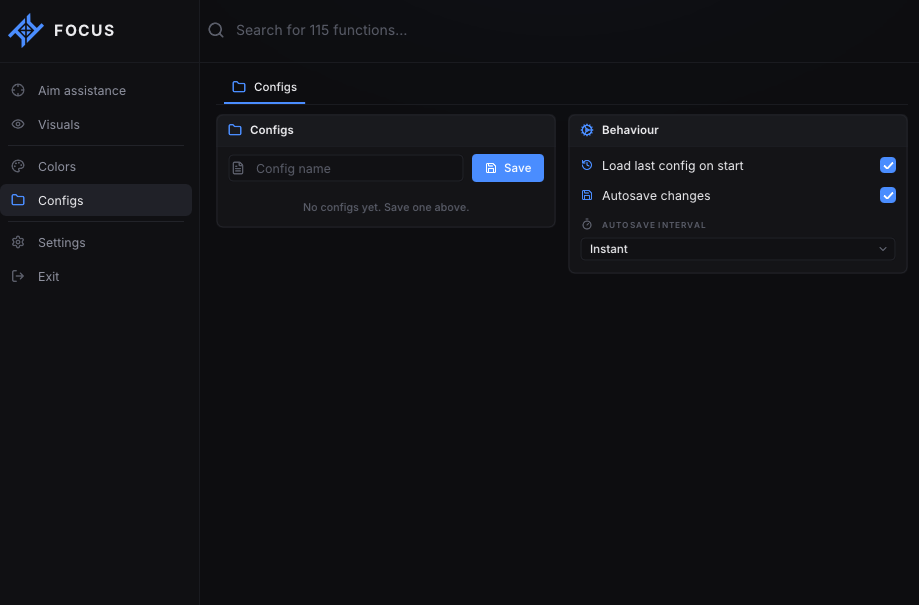
- Named configs — Save / load / delete.
- Load last config on start — On by default.
- Autosave changes — On by default.
- Autosave interval — Instant / 30 seconds / 5 minutes
СИСТЕМНЫЕ ТРЕБОВАНИЯ
Windows 10: 22H2
Windows 11: 25H2
Processor: AMD / Intel
Architecture: x64 only (64-bit)
Platform: Steam only
Windows 11: 25H2
Processor: AMD / Intel
Architecture: x64 only (64-bit)
Platform: Steam only