Specter
ОПИСАНИЕ
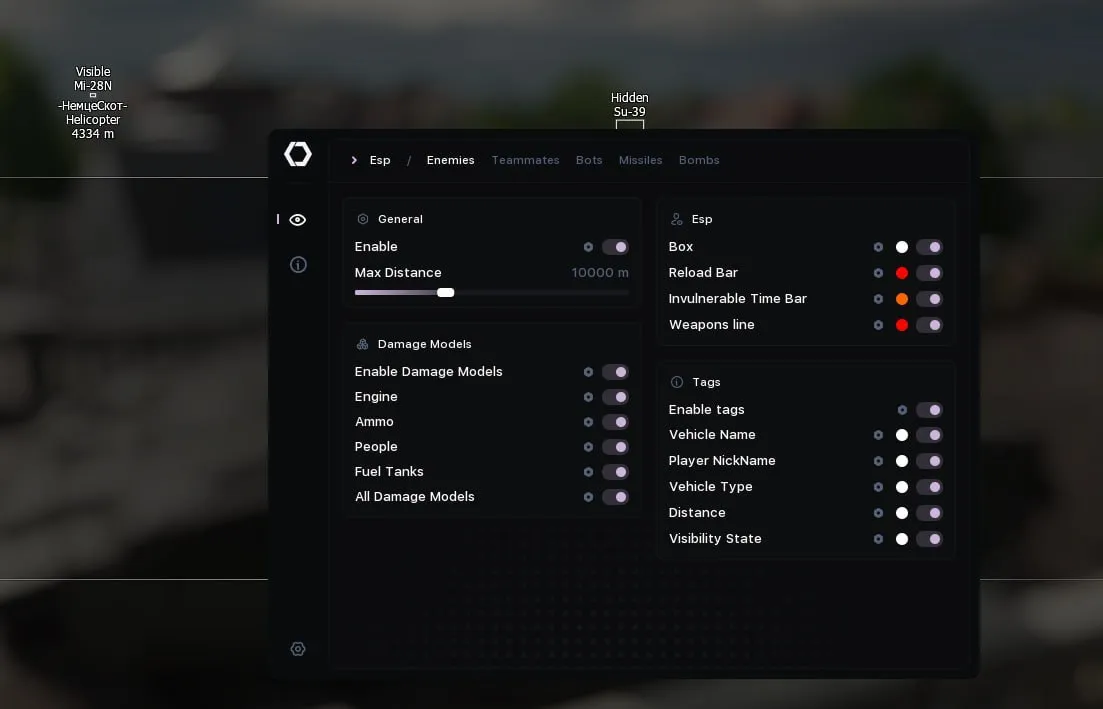
ESP for Enemies / Teammates / Bots
Main Settings
Enabled: Enable ESP
Enabled Tanks: Enable on tanks
Enabled Planes: Enable on planes
Enabled Helicopters: Enable on helicopters
Enabled Ships: Enable on ships
Max Distance: Maximum display distance
Max Dormant Time: Maximum inactivity time (ms)
Dormant Color Alpha Multiplier: Transparency multiplier for inactive objects
Bounding Box Settings
Draw Bounding Box: Display the bounding box
Bounding Box Type: Box type (2D / 2D with corners / 3D)
Bounding Box Color: Color of the bounding box
Bounding Box Fill Color: Fill color of the bounding box
Bounding Box 3D Front Color: Color of the front part of the 3D box
Bounding Box Thickness: Thickness of the box lines
Bounding Box Rounding: Corner rounding of the box
Reload Bar Settings
Draw Reload Bar: Display the reload bar
Draw Reload Bar Only If Reloading: Show only during active reload
Reload Bar Bound: Position of the reload bar
Reload Bar Resize Type: Resize type for the bar
Reload Bar Background Color: Background color of the reload bar
Reload Bar Full Color: Color for full reload
Reload Bar Not Full Color: Color for incomplete reload
Reload Bar Frame Color: Color of the reload bar frame
Reload Bar Frame Rounding: Rounding of the reload bar frame
Reload Bar Width: Width of the reload bar
Invulnerable Bar Settings
Draw Invulnerable Bar: Display the invulnerability bar
Draw Invulnerable Bar Only If Invulnerable: Show only when invulnerable
Invulnerable Bar Bound: Position of the invulnerability bar
Invulnerable Resize Type: Resize type for the bar
Invulnerable Bar Background Color: Background color of the invulnerability bar
Invulnerable Bar Color: Color of the invulnerability bar
Invulnerable Bar Frame Color: Color of the invulnerability bar frame
Invulnerable Bar Frame Rounding: Rounding of the invulnerability bar frame
Invulnerable Bar Width: Width of the invulnerability bar
Tags Settings
Tags Enabled: Enable tags
Tags Draw Vehicle Name: Display the vehicle name
Tags Vehicle Name Bound: Position of the vehicle name
Tags Vehicle Name Color: Color of the vehicle name
Tags Draw Player Nick: Display the player's nickname
Tags Player Nick Bound: Position of the player's nickname
Tags Player Nick Color: Color of the player's nickname
Tags Draw Vehicle Type: Display the vehicle type
Tags Vehicle Type Bound: Position of the vehicle type
Tags Vehicle Type Color: Color of the vehicle type
Tags Draw Distance: Display the distance
Tags Distance Bound: Position of the distance
Tags Distance Color: Color of the distance
Tags Draw Visibility State: Display the visibility state
Tags Visibility State Bound: Position of the visibility state
Tags Visibility State Color: Color of the visibility state
Tags Frame: Frame around the tags
Tags Text Outline: Outline for tag text
Tags Text Outline Color: Color of the text outline
Tags Frame Color: Color of the tag frame
Tags Frame Rounding: Rounding of the tag frame
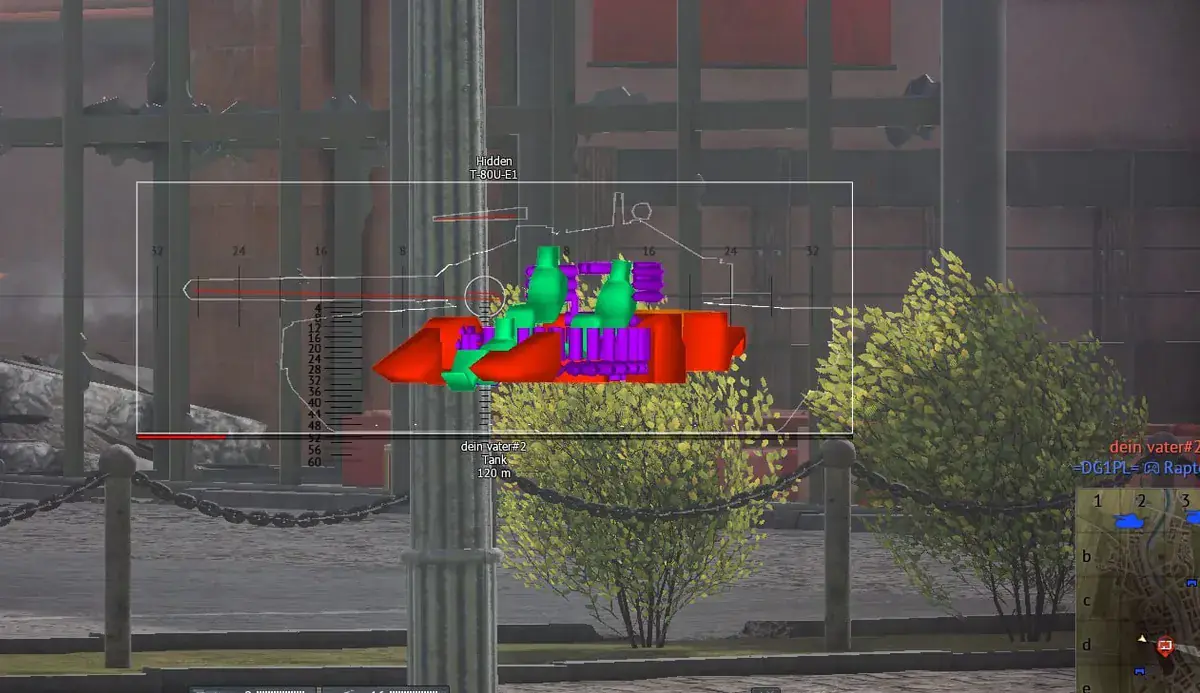
Damage Models Settings
Damage Models Enabled: Enable damage models
Outline Thickness: Thickness of the outline
Engine:
Draw Engine: Display the engine
Draw Engine Model: Display the engine model
Engine Color: Color of the engine
Draw Engine Outline: Display the engine outline
Engine Outline Color: Color of the engine outline
Ammo:
Draw Ammo: Display ammo
Draw Ammo Model: Display ammo model
Ammo Color: Color of ammo
Draw Ammo Outline: Display ammo outline
Ammo Outline Color: Color of ammo outline
People (Crew):
Draw People: Display the crew
Draw People Model: Display the crew model
People Color: Color of the crew
Draw People Outline: Display the crew outline
People Outline Color: Color of the crew outline
Fuel Tanks:
Draw Fuel Tanks: Display fuel tanks
Draw Fuel Tanks Model: Display fuel tank model
Fuel Tanks Color: Color of fuel tanks
Draw Fuel Tanks Outline: Display fuel tank outline
Fuel Tanks Outline Color: Color of fuel tank outline
All Damage Models:
Draw All Damage Models: Display all damage models
Draw All Damage Models Model: Display all damage models
All Damage Models Color: Color of all damage models
Draw All Damage Models Outline: Display all model outlines
All Damage Models Outline Color: Color of all model outlines
Weapons Line Settings
Draw Weapons Line: Display the weapon line
Draw Only Main Weapons Line: Display only the main weapon line
Draw Weapons Line Color: Color of the weapon line
ESP for Missiles / Bombs
Main Settings
Enabled: Enable ESP
Max Distance: Maximum display distance
Icon Settings
Draw Icon: Display the icon
Icon Draw Type: Display type (Dot / Icon)
Draw Icon Color: Color of the icon
Draw Icon Size: Size of the icon
Projectile Tags Settings
Tags Enabled: Enable tags
Tags Draw Distance: Display the distance
Tags Distance Bound: Position of the distance
Tags Distance Color: Color of the distance
Tags Draw Name: Display the name
Tags Name Bound: Position of the name
Tags Name Color: Color of the name
Tags Draw Mass: Display the mass
Tags Mass Bound: Position of the mass
Tags Mass Color: Color of the mass
Tags Draw Speed: Display the speed
Tags Speed Bound: Position of the speed
Tags Speed Color: Color of the speed
Direction & Explosion Timer (Bombs)
Draw Direction: Display the direction
Direction Length: Length of the direction line
Direction Color: Color of the direction line
Draw Explosion Timer Bar: Display the explosion timer
Explosion Timer Bar Bound: Position of the explosion timer
Explosion Timer Bar Resize Type: Resize type for the timer
Explosion Timer Bar Background Color: Background color of the explosion timer
Explosion Timer Bar Color: Color of the explosion timer
Explosion Timer Bar Frame Color: Color of the explosion timer frame
Explosion Timer Bar Frame Rounding: Rounding of the explosion timer frame
Explosion Timer Bar Width: Width of the explosion timer
General Settings
Main Parameters
Language: Interface language
Fps Sync With Game Supported: Support for synchronizing FPS with the game
Fps Sync With Game: Synchronize FPS with the game
Overlay V-Sync: Vertical synchronization for the overlay
Overlay GPU Priority: GPU priority for the overlay
Complaints Window Settings
Complaints Window: Enable the complaints window
Complaints Window Background Color: Background color of the complaints window
Complaints Window Title Color: Title color of the complaints window
Complaints Window Pos X: X-axis window position
Complaints Window Pos Y: Y-axis window position
MiniMap Settings
Main MiniMap Settings
MiniMap Window: Enable the minimap window
MiniMap Window Pos X: X-axis minimap position
MiniMap Window Pos Y: Y-axis minimap position
MiniMap Color: Background color of the minimap
MiniMap Size: Size of the minimap
MiniMap Radius: Display radius of the minimap
MiniMap Circles Radius: Radius of the circles on the minimap
MiniMap Barrels Length: Length of the weapon barrels on the minimap
Self Vehicle Settings
MiniMap Self Color: Color of your own vehicle
MiniMap Draw Self Barrel: Display your own weapon barrel
MiniMap Draw Self Barrel Color: Color of your own weapon barrel
Enemies Settings
MiniMap Draw Enemies: Display enemies
MiniMap Draw Enemies Color: Color of enemies
MiniMap Draw Enemies Barrel: Display enemy weapon barrels
MiniMap Draw Enemies Barrel Color: Color of enemy weapon barrels
Teammates Settings
MiniMap Draw Teammates: Display teammates
MiniMap Draw Teammates Color: Color of teammates
MiniMap Draw Teammates Barrel: Display teammate weapon barrels
MiniMap Draw Teammates Barrel Color: Color of teammate weapon barrels
Bots Settings
MiniMap Draw Bots: Display bots
MiniMap Draw Bots Color: Color of bots
MiniMap Draw Bots Barrel: Display bot weapon barrels
MiniMap Draw Bots Barrel Color: Color of bot weapon barrels
Missiles Settings
MiniMap Draw Missiles: Display missiles
MiniMap Draw Missiles Color: Color of missiles
MiniMap Draw Missiles Barrel: Display missile direction
MiniMap Draw Missiles Barrel Color: Color of missile direction
MiniMap Missiles Font Size: Font size for missiles
Bombs Settings
MiniMap Draw Bombs: Display bombs
MiniMap Draw Bombs Color: Color of bombs
MiniMap Draw Bombs Barrel: Display bomb direction
MiniMap Draw Bombs Barrel Color: Color of bomb direction
MiniMap Bombs Font Size: Font size for bombs
ФУНКЦИИ
СИСТЕМНЫЕ ТРЕБОВАНИЯ
Processor with virtualization support (AMD/INTEL)
Virtualization enabled in BIOS
Windows 10/11 21H2 - 26H2