
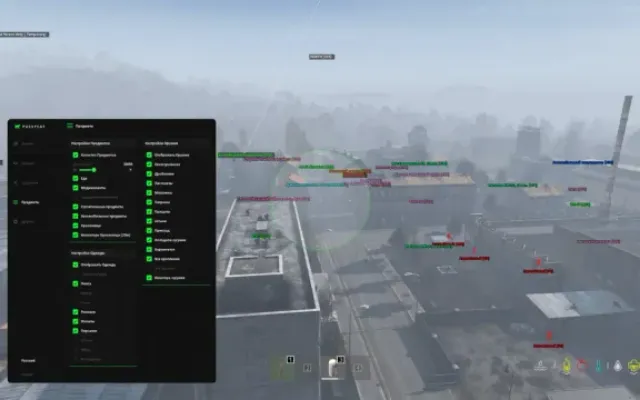
715 Team Web Radar
Player
1. Enable Player - enable display of players on the map
2. Enable player name - enable display of player names
3. Hide corpse player - hide to show dead players
4. Auto follow player - enable automatic map movement for local player
5. Map scale for follow - map zoom size when moving automatically
6. Player icon size - customize icon size for players
7. Player font size - adjust text font size for players
8. Player icon color - customize icon color for players
9. Player text color - customize text font color for players
10. Local icon color - customize icon color for local player
11. Local text color - set text font color for local player
12. Corpse player color - customize icon color and text font for dead players
Zombie
1. Enable zombie - enable display of zombies on the map
2. Enable zombie name - enable display of zombie names
3. Hide corpse zombie - hide to show dead zombies
4. Zombie icon size - adjust zombie icon size
5. Zombie font size - adjust zombie text font size
6. Zombie icon color - customize zombie icon color
7. Zombie text color - customize zombie text font color
8. Corpse zombie color - customize icon color and text font for dead zombies
Car
1. Enable car - enable display of cars on the map
2. Enable car name - enable display of car names
3. Hide destroyed car - hide to show destroyed cars
4. Car icon size - adjust icon size for cars
5. Car font size - adjust text font size for cars
6. Car icon color - customize icon color for cars
7. Car text color - customize text font color for cars
8. Destroyed car color - customize icon color and text font for destroyed cars
Animal
1. Enable animal - enable display of animals on the map
2. Enable animal name - enable display of animal names
3. Hide corpse animal - hide to show dead animals
4. Animal icon size - adjust icon size for animals
5. Animal font size - adjust text font size for animals
6. Animal icon color - customize icon color for animals
7. Animal text color - customize text font color for animals
8. Corpse animal color - customize icon color and text font for dead animals
Loot
1. Enable item - enable display of loot on map
2. Enable item name - enable display of loot names
3. Loot icon size - adjust icon size for animals
4. Loot font size - adjust text font size for animals
5. Cloth / Cloth color - enable display of clothes / Customize icon and text font color for clothes
6. Food / Food Color - enable food display / Customize food icon and text font color
7. Weapon / Weapon Color - enable weapon display / Customize weapon icon and text font color
8. Ammunation / Ammunation Color - enable display of Ammunation / Customize icon and text font color for Ammunation
9. Attachments / Attachments Color - enable display of devices for different types of things / Customize the color of the icon and text font for devices for different types of things
10. Medical / Medical Color - enable display of medicine / Customize icon and text font color for medicine
11. Vehicles / Vehicles Color - enable display of car parts / Customize icon and text font color for parts
12. Tools / Tools Color - enable display of construction equipment, etc. / Customize icon and text font color for construction equipment, etc.
13. Crafting / Crafting Color - enable display of items for crafting / Customize the color of the icon and font of the text for crafting
14. Container / Container Color - enable display of containers, boxes, etc. / Customize icon and text font color for containers
15. Other / Other Color - enable display of loot that is not filtered by categories (mainly needed for mod servers) / Customize the icon color and text font for the rest of the loot
OTHER3
- All functions in the description
- Select map
- Save Settings - save menu settings
- The supplier has not listed exact system requirements.
- Before buying, confirm the compatibility of your Windows version, game version and launch method with support.
More DayZ cheats
All cheats
Before you buy: what cheat statuses mean, how to check system requirements, how to buy a cheat. See also all DayZ cheats and all 715 Team cheats.